
PT. Fajar Sejahtera Bersama
Fajar mobile apps
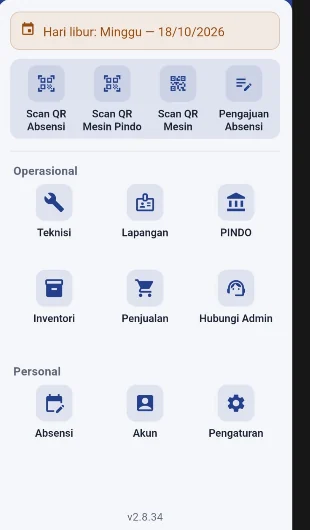
Clock in, scan a machine, send a technician, and keep field visits, stock, and sales in the same app.
The situation
Clocking in, machines, technicians, field visits, stock, and sales lived in different places. Work outside the office meant switching tools.
-
Attendance
Clock in, scan an attendance QR, and file an attendance request. The history stays available. Out of the office, someone can file a request, including sick leave, permission, or annual leave.
-
Scan a machine
A machine's history from a QR code or serial number. Scan the code or type the serial, and that machine opens without hunting through a list.
-
Technician
Service jobs, the open pool, work history, and performance. Assigned orders sit on Service. The open pool is work not taken yet, history is past jobs, and performance is how the work went.
-
Field
Counter checks, delivering or pulling a machine, and handing over bills, contracts, and offers. Cash collected in the field, and payment links for bills or technical jobs, are recorded here too.
-
PINDO
Counter checks, repairs, and the PINDO rental machine list. The QR can be scanned or typed in. Readings are uploaded, and each period's history is kept.
-
Inventory
Look up stock by warehouse, request items, and record parts used in a repair. Search by name or SKU for the price and the stock in each warehouse. An item request to the main warehouse goes through PBS, and parts used on a repair go through Office Use.
-
Sales
Record a field sale, yearly targets, customers, and payment links. A new sale is written here with the customer. The year's target, and which products sold the most, are on the same screen.